Automation That Works For You
Set it up once, it runs forever. Let Cake Budget handle the tedious parts of money management while you focus on living your life.
Three Types of Rules, Endless Possibilities
Create powerful automation with our three rule types. Each serves a different purpose, and they work together seamlessly.
Transaction Rules
Automatically categorize and assign transactions based on merchant, amount, category, or description. Uses AND/OR logic for complex matching.
Examples:
- • If merchant contains 'Starbucks' → Coffee slice
- • If amount > $100 AND category = 'Shopping' → Big Purchase slice
- • If description contains 'Uber' AND amount < $25 → Transportation slice
Balance Rules
Trigger actions based on slice or Safe-to-Spend balances. Perfect for automatic savings or preventing overdrafts.
Examples:
- • When Checking slice > $3000 → Transfer $500 to Savings
- • When Safe-to-Spend < $100 → Move $200 from Emergency Fund
- • When Vacation slice > $2000 → Move the extra $250 to Flights
Date-Based Rules
Apply special handling during specific date ranges. Perfect for trips, holidays, or time-boxed projects.
Examples:
- • Dec 15-31: All transactions → Holiday Shopping slice
- • During vacation dates: Everything → Hawaii Trip slice
- • Conference week: Everything → Work Trip slice, tagged with a note
Funding Schedules (Paycheck Detection)
Automatically distribute incoming paychecks to your slices. Smart detection handles early/late deposits and irregular amounts.
Key Features:
- Detects paychecks up to 5 days early or a day late
- Different schedules for different income sources
- Percentage or fixed amount distribution
- Handles 3-paycheck months automatically
- Matches by keyword and amount, not just date
Example Setup:
1st paycheck: 100% → Rent. 2nd paycheck: 40% → Savings, 30% → Bills, 30% → Spending
Powerful Actions for Every Rule Type
Transaction Rules
- Assign to slice
- Assign category
- Split transaction
- Round up for savings
- Update description
- Add notes
Balance Rules
- Transfer funds between slices
- Top up a slice from Safe to Spend
- Move overflow back to Safe to Spend
Date Rules
- Route all transactions to slice
- Assign a category
- Transfer funds
- Add contextual notes
Enterprise-Grade Automation Engine
Rule Logic
- AND/OR conditions for complex matching
- Multiple conditions per rule
- Chain multiple actions together
- One-tap rule suggestions from your own history
- Auto-paused rules tell you why
Smart Detection
- Paycheck detection with a 5-day early grace window
- Recurring transaction identification
- Match on name fragments, amounts, or both
- Case-insensitive merchant matching
- Amount thresholds and ranges
Execution & History
- See which rules fired on each transaction
- Backfill categories, descriptions, and notes to past transactions
- One batched email per transaction, not one per rule
- Money-moving actions never run on historical imports
Visual Rule Builder
Create complex rules with our intuitive interface. No coding required - just point, click, and automate.
Creating a Transaction Rule
Set conditions and actions for automatic transaction handling
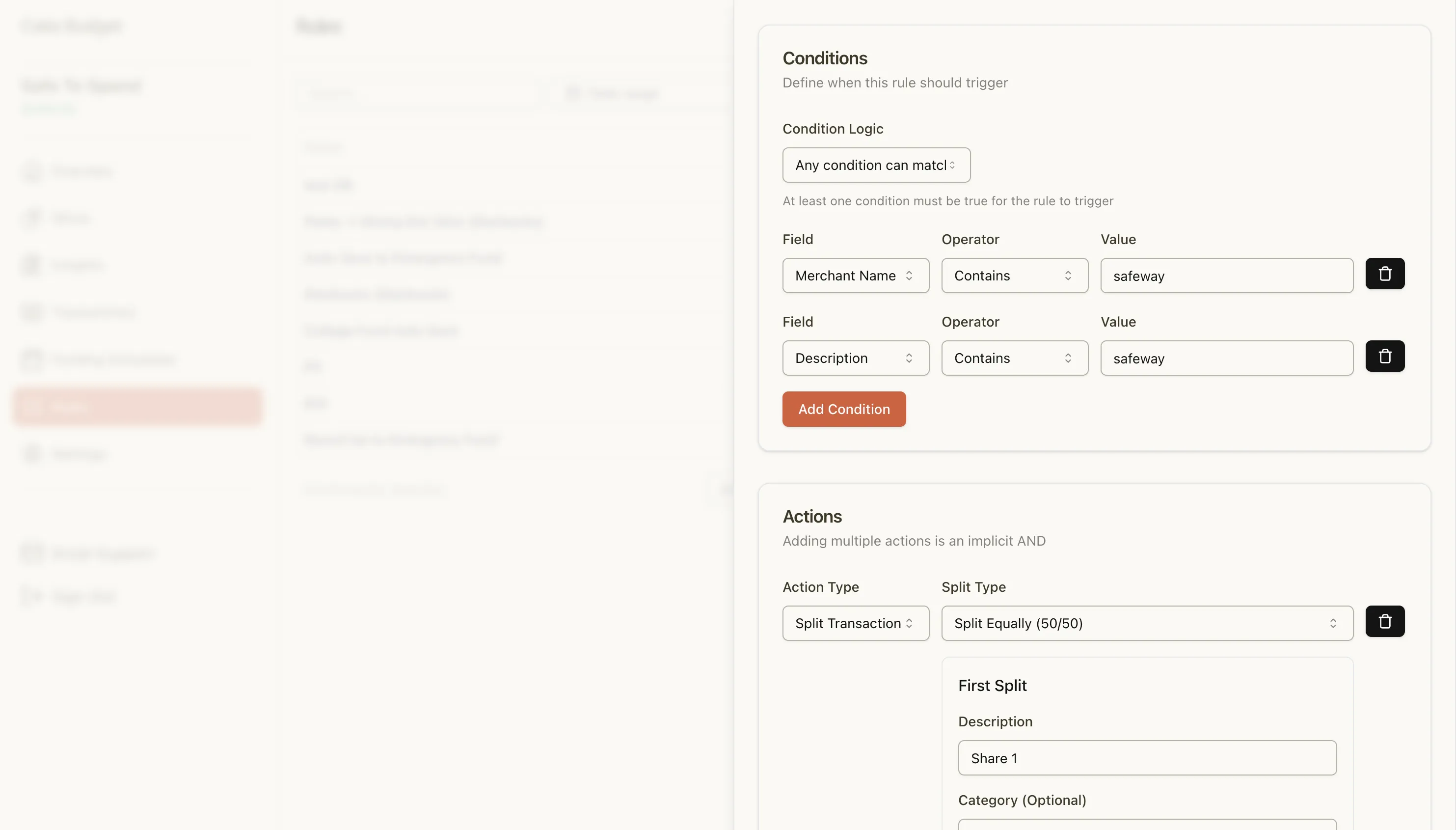
Define what triggers your rule - merchant names, amounts, categories, or descriptions. Then choose what happens when those conditions are met.
Complex Logic Made Simple
Combine multiple conditions with AND/OR operators
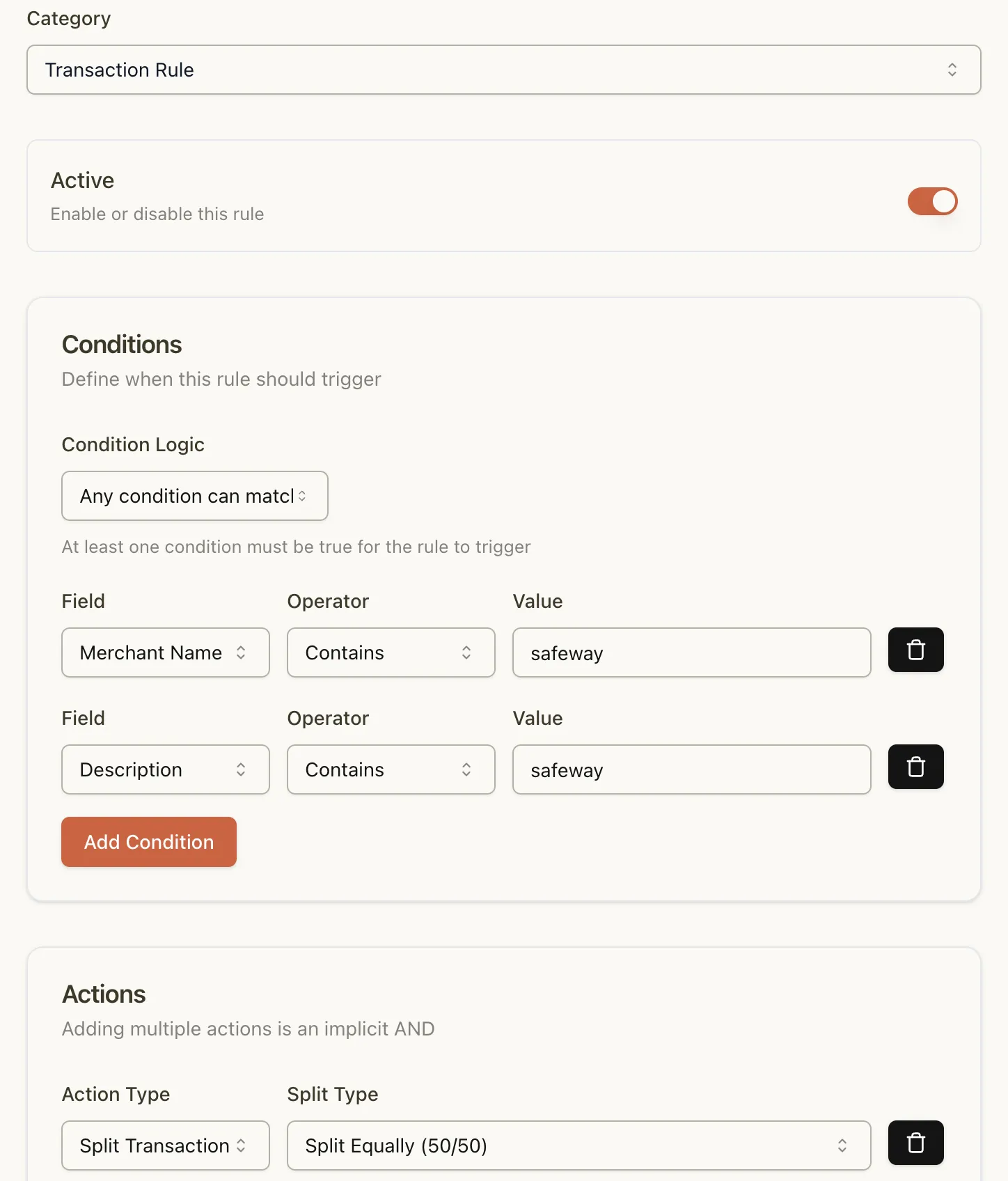
Need more sophisticated rules? Combine conditions with AND/OR logic. Perfect for handling edge cases and creating precise automation that matches your real-world needs.
Comprehensive Rule Management
See all your rules at a glance and manage them easily
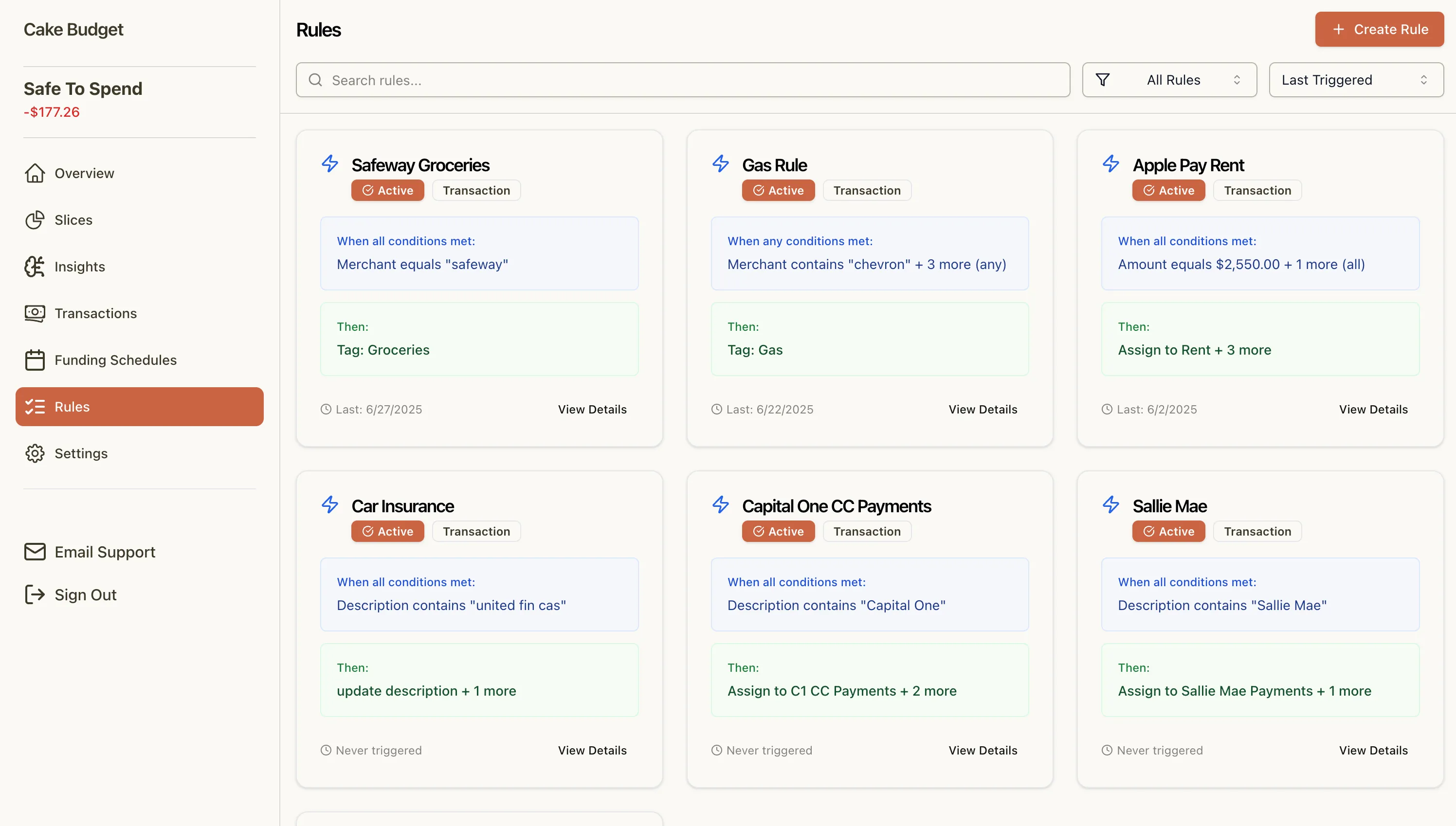
Your rules dashboard shows everything at a glance. See which rules are active, when they last triggered, and quickly make adjustments as your needs change.
Available on All Paid Plans
Starter - $9/mo
- • Full automation suite
- • 1 bank connection
- • Real-time sync
- • All rule types
Pro - $15/mo
- • Everything in Starter
- • 4 bank connections
- • Priority support
Family - $25/mo
- • Everything in Pro
- • 7 bank connections
- • Up to 5 users
- • Household coordination
14-day free trial • No credit card required • Cancel anytime
See It In Action: A Complete Example
Paycheck Arrives (Funding Schedule)
Your $3,000 paycheck is detected and automatically distributed: $1,500 to Rent, $500 to Savings, $1,000 to Spending
You Buy Coffee (Transaction Rule)
Starbucks purchase automatically goes to your Coffee slice, updating your Safe-to-Spend in real-time
Vacation Starts (Date-Based Rule)
All transactions from June 15-22 automatically route to your Hawaii Trip slice
Savings Goal Hit (Balance Rule)
Emergency Fund passes $5,000, automatically moves $250 to the Investment slice
Why Automation Matters for ADHD
Executive Function Support
Removes the need to remember and manually categorize every transaction
Reduced Decision Fatigue
Rules make decisions for you based on your pre-set preferences
Consistency Without Effort
Your budget stays organized even when you forget to check it
Budget with confidence, not confusion
Budgeting that just makes sense. Try Cake Budget today!